
Overview
To maintain payroll data accuracy and prevent conflicts, the system restricts the processing of Time Adjustment Imports while a Payroll Simulation is currently running. This article explains the system behavior, restriction logic, and what users should do if they encounter this limitation.
What Is the Restriction?
The system automatically blocks the processing of any Time Adjustment Upload whenever the Payroll Simulation is currently running. This ensures that payroll calculations are not affected by mid-process data changes.
When Does This Happen?
This restriction is triggered when:
A Payroll Simulation has been started and is still in progress, and
A user attempts to upload or process a Time Adjustment Import during this period
System Behavior
When a Time Adjustment file is uploaded while a Payroll Simulation is running, the system will:
❌ Reject or stop the upload process
⚠️ Display an error message to the user
Error Message:
“Ongoing simulation. Please try again later.”
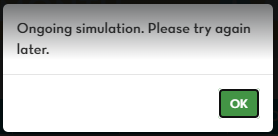
No data from the uploaded file will be saved or processed.
How to Resolve the Issue?
If you encounter this error, you may:
Wait for the Payroll Simulation to complete, then re-upload the Time Adjustment file
Confirm with the payroll administrator that no active simulation is running
Retry the upload once the system allows processing
Important Notes
This restriction is system-enforced and cannot be bypassed
It helps ensure payroll accuracy and data consistency
Time Adjustments should always be uploaded before or after payroll simulations